How Moonchild AI Can Reduce Time Spent Designing in Figma
Updated January 22, 2026
Most Figma work falls into two broad phases: structure and refinement.
Structure includes tasks like building layouts, placing components, applying tokens, and setting up spacing systems. Refinement includes polishing visuals, handling edge cases, designing interactions, and preparing designs for development.
Structure work is necessary but time-consuming. Tools like Moonchild AI help shift that balance by generating much of the structural work upfront, allowing designers to spend more of their time refining and improving the design.
Where Figma time actually goes
In a typical design session, a surprising amount of time is spent on structural tasks before refinement even begins.
Traditional 8-hour Figma day:
- Creating frames and setting up layouts
- Placing components and arranging them
- Applying colors, typography, and tokens
- Adjusting spacing and alignment
These steps can easily take half of a designer's time before any real polishing begins. Only after this work is done can designers focus on the details that actually shape the experience, the visual hierarchy, states, interactions, and usability improvements.
With Moonchild: Structure happens in Moonchild
Moonchild changes this workflow by generating the structural foundation of the interface before work begins in Figma.
Instead of manually creating layouts and placing components, designers can prompt Moonchild with product requirements or a feature description. Within minutes, the tool generates multiple screens that follow the structure of the requested flow.
Once exported to Figma, the designer is no longer starting from a blank canvas. The frames, layouts, and component placements are already present, making it easier to refine and handoff for development.
This shifts the designer's time from building layouts to improving them.
What Moonchild removes from Figma's workload
Frame setup: Moonchild generates the frames and overall layout structure automatically.
Component placement: Forms, cards, and UI elements are already placed in logical positions.
Token application: Colors, typography, and spacing follow the design system defined in the prompt or configuration.
Initial layout alignment: Spacing and hierarchy are already structured, reducing the need for extensive layout adjustments.
Instead of constructing these elements manually, designers begin with a working interface that can be refined.
What Figma refinement adds
Optical polish: Is the spacing mathematically correct but visually wrong? Adjust.
Color emphasis: Does the primary action pop enough? Adjust the color weight or add a subtle gradient.
Edge cases: Empty state, loading state, error state, disabled state. Moonchild generates the primary state; Figma refines edge cases.
Micro-interactions: Hover states, focus states, active states. Figma is where these details live.
Responsive design: Mobile breakpoints, tablet layouts. Moonchild generates one size; Figma adapts to multiple sizes.
Dev handoff prep: Clean layer naming, design tokens documentation, design specs. Figma is where handoff happens.
A Simple Example: Designing a Dashboard
Usually, without assistance, a designer might spend hours setting up frames, placing components, and applying design tokens before even reaching the polishing stage.
With Moonchild, the initial layout and component structure can be generated first. The designer can then bring the result into Figma and focus on refining visual hierarchy, adjusting spacing, and adding interaction states.
Let's use this prompt to see how fast and easy it is to generate a dashboard with Moonchild.
Design a mobile dashboard for a travel planning app. Include upcoming trips, flight details, saved destinations, and travel recommendations.
Here's the result of the prompt:
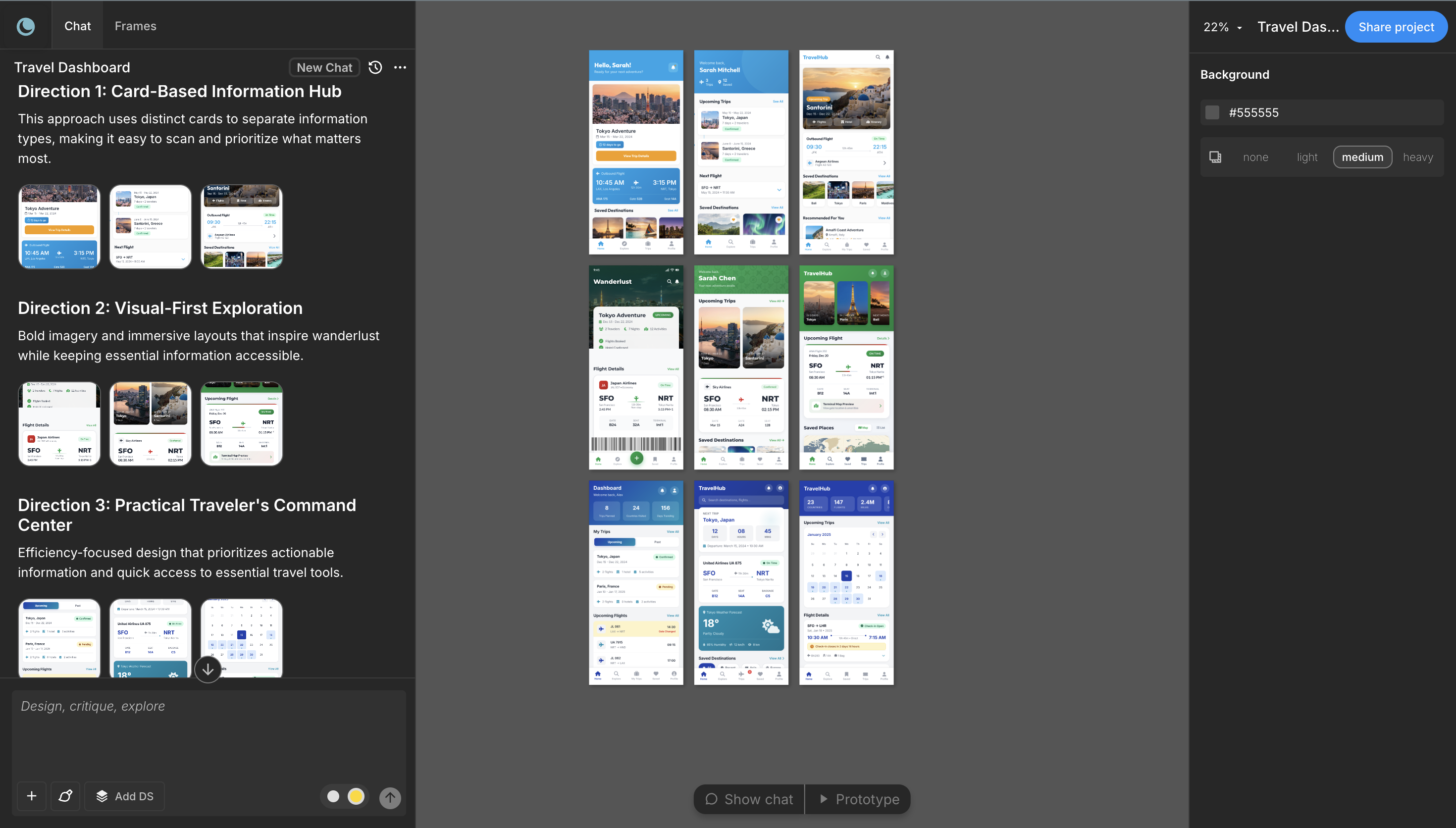
In less than 5 minutes, Moonchild AI generated three different layouts showcasing a travel dashboard, saved destinations, upcoming trips, etc.
This is the foundation for a very promising project.
For design teams, when structural work is automated or accelerated, designers gain more time for higher-value tasks.
This means that instead of spending most of the day building layouts, they can focus on improving usability, refining visual hierarchy, designing interactions, solving edge cases, and evolving the design system.
Over time, this shift can significantly increase a team's capacity without increasing working hours.
Conclusion
Moonchild does not replace Figma. Instead, it changes how Figma is used.
By generating the structural foundation of an interface, Moonchild allows designers to spend less time constructing layouts and more time refining the experience.
The result is not just faster design, but more time spent on the parts of design that matter most.
Try Moonchild
Want this for your team?
Bring your design system into Moonchild and let PMs, designers, and engineers ship on-brand UI together — without breaking consistency.
Written by
Nicolas CerveauxFounding Design Engineer at Moonchild AI. Bridging design systems and engineering to build the future of AI-native product design.
Related Articles
Bringing Screens From Figma Into Moonchild
Moonchild isn't just for generating screens from prompts. You can import existing Figma designs and use them as a starting point for AI-powered exploration and variations.
How to Export AI-Generated UI from Moonchild to Figma
You've generated screens in Moonchild that your team loves. Now you need them in Figma — not as static images, but as real, editable files. Here's how to do it in seconds.
How to Build an AI Design Tool Stack That Actually Works
Most teams use too many AI design tools or the wrong combination. Learn how to build a focused tool stack that covers ideation, generation, refinement, and handoff without redundancy.