Design Systems and AI: What Actually Works and What Doesn't
Updated February 22, 2026
Design Systems and AI: What Actually Works and What Doesn't
The promise of AI-generated design systems is compelling. Instead of months building infrastructure, you generate a complete system in minutes. Colors with accessibility built in. Typography scales derived from your product positioning. Components with all variants. Source code ready for developers. Documentation complete.
The reality is more nuanced. AI is genuinely powerful at generating design systems, but most tools produce generic output that has no relationship to your actual product. Understanding where AI excels, where it falls short, and how Moonchild AI solves the gap is critical for teams evaluating this approach.
What AI Does Well: The Foundation Layer
AI is genuinely effective at certain design system components.
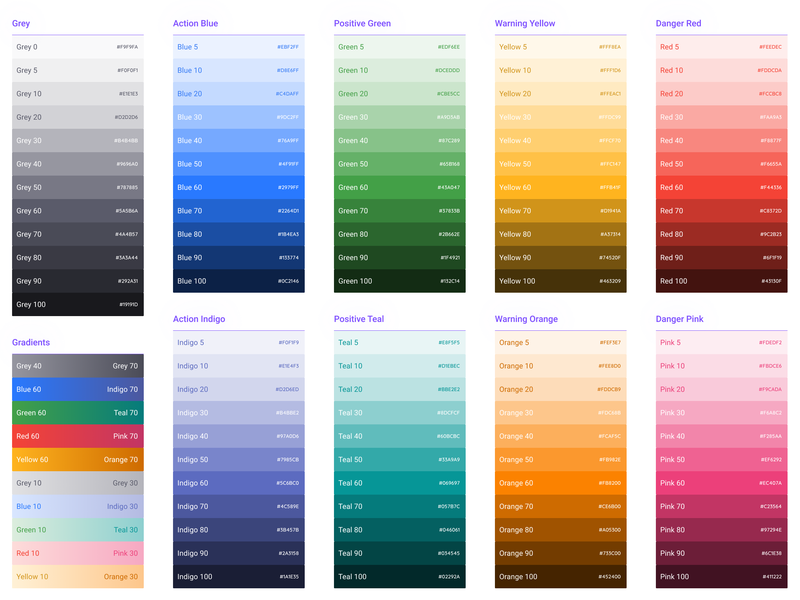
Color palettes are one of the strongest areas. AI can generate palettes with semantic meaning, automatically evaluate WCAG contrast ratios across different text sizes and backgrounds, create accessible color combinations, and flag problematic pairings. It can generate 60 to 80 colors organized by semantic purpose — primary, secondary, neutral, status — in seconds. Most teams find that generated color systems are 85 to 95 percent right.
Typography scales are another strength. AI understands modular scales and can apply mathematical progressions to ensure hierarchy is consistent. It generates complete scales with specific sizes, line heights, weights, and usage documentation. Most teams find typography is 80 to 90 percent right.
Spacing systems are excellent. AI generates consistent spacing scales with clear usage documentation. Spacing systems generated by AI are usually 90 percent right because the logic is mathematical and the usage rules are clear.
Component scaffolding is solid. AI can generate buttons with all states and variants, inputs with placeholder, focus, error, and disabled states, cards with different layouts, navigation elements, modals, tabs, and other fundamentals.
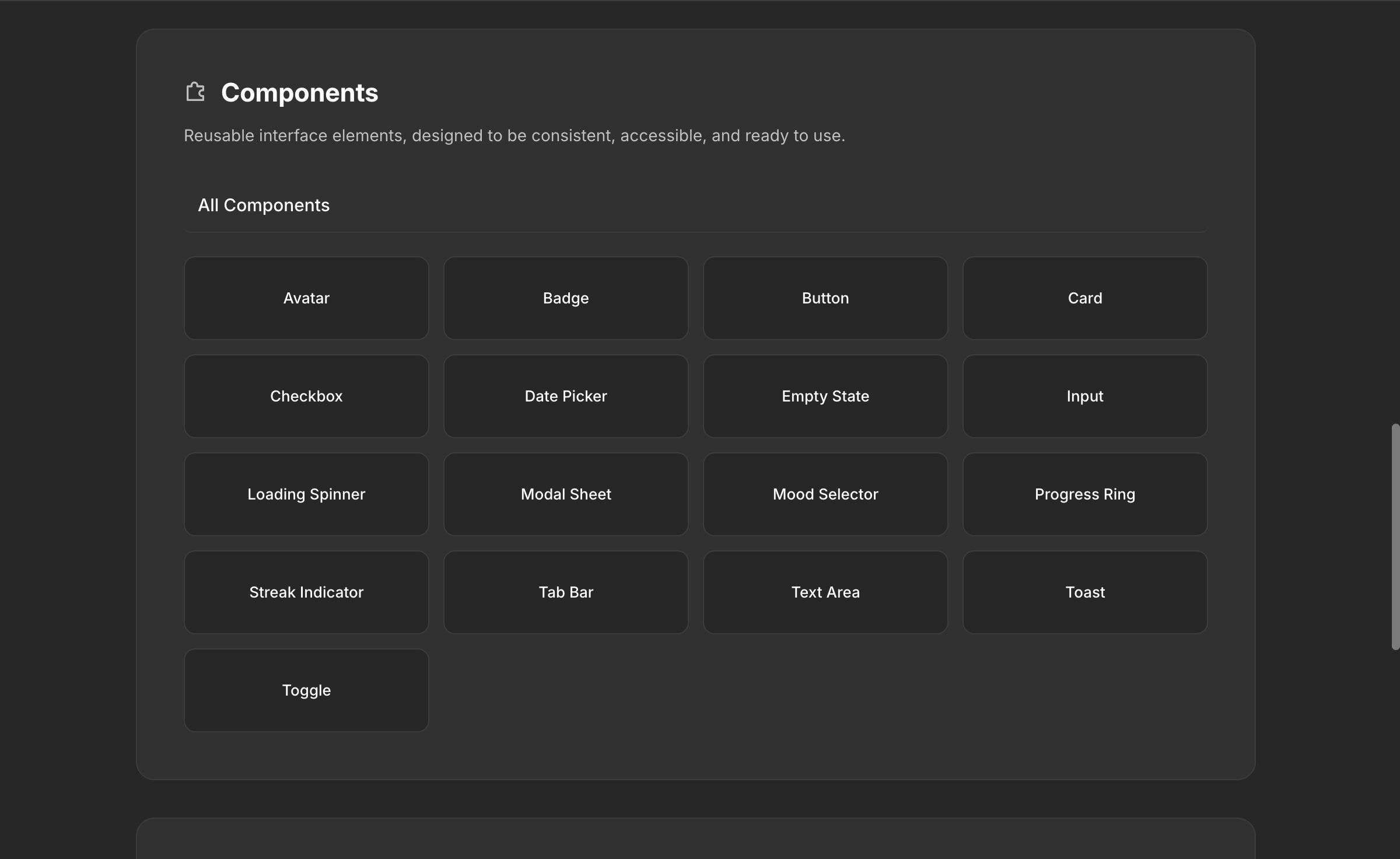
Documentation is comprehensive and automatically generated. Every component includes usage guidelines, state descriptions, and accessibility notes. Theme variations like dark mode can be automatically generated by adjusting color token relationships while maintaining contrast.
This foundation layer is where AI creates genuine value. Infrastructure work that would take weeks or months happens in minutes.
Where Most AI Tools Fall Short: The Critical Gap
Here's the problem. Most AI design tools generate design systems that look complete but are fundamentally disconnected from your actual product. They produce generic tokens, generic components, and generic patterns. They don't understand that your input field has five different states depending on context. They don't know that your button component behaves differently inside a modal than it does on a page. They don't replicate the complex relationships between your components — the conditional logic, the contextual variants, the behavior rules that make your product feel like your product.
Brand nuance is the most visible gap. AI can generate a mathematically balanced palette. A human needs to decide whether that palette conveys the right emotional response for your specific product and users.
Interaction design edge cases are harder. A multi-step form with conditional logic, validation, error recovery, and help text integration. A search interface that changes based on what the user is searching for. An input field with multiple options, values, and behaviors depending on context. These aren't standard components — they're application-specific patterns that require deep product knowledge.
Organizational and cultural context is invisible to most AI tools. Your company might have specific interaction patterns, visual conventions, or accessibility accommodations that are meaningful to your team and users. Generic AI generation misses all of this.
How Moonchild AI Solves the 80/20 Problem
This is where Moonchild AI is fundamentally different from every other tool on the market.
Most AI design tools treat design systems as a cosmetic layer — colors, fonts, spacing applied on top of generic generation. Moonchild was built to replicate and improve the full complexity of your source of truth. Your design system in Moonchild matches your actual components, your actual tokens, and the complicated relationships between them.
That input field with five different states depending on context? Moonchild represents that. The button that behaves differently inside a modal? That relationship is captured. The conditional logic in your form wizard? It's part of the system. Moonchild doesn't flatten your design system into a color palette and a font stack — it preserves the depth that makes your system actually useful for generating production-quality screens.
This is why Moonchild-generated UI looks like it belongs to your product on the first pass, while screens from other tools look like they're wearing your brand colors as a costume.
The 80/20 problem hasn't disappeared — AI still handles the infrastructure layer (the 80%) and human judgment handles brand refinement and edge cases (the 20%). But Moonchild pushes that ratio closer to 90/10 by understanding what other tools ignore: the relationships, rules, and complexity that make a design system more than just a token library.
Setting Up Your Design System: Guided vs Unguided
Moonchild offers two paths for getting your design system into the platform, and each has clear tradeoffs.
Guided Setup: The Moonchild Team Sets It Up For You
The recommended path. You book a call with the Moonchild team (typically within a day), and the team works directly with you to understand your design system — whether your source of truth lives in Figma, Storybook, or directly in code. They review the complexity, the relationships between components, the rules and constraints, and set up a polished, production-ready DS inside Moonchild.
Pros: The team has set up hundreds of design systems and knows how to capture complexity that's easy to miss. They'll catch edge cases in your system that you might not think to communicate. The result is immediately usable and production-quality. This path is fastest for teams that want to start generating with their DS right away.
Cons: Requires scheduling a call and working with the team's availability. Less hands-on learning about the DS editor for your team. If your system changes frequently, you'll want your team to learn the editor eventually anyway.
Best for: teams with established, complex design systems who want the highest-quality import. Enterprise teams. Teams where the DS source of truth has years of accumulated decisions.
Unguided Setup: Build It Yourself
You enter the DS editor directly and use the AI chat to build your system conversationally. You describe your product, your constraints, your components, and Moonchild guides you through supplying all the information needed to build out a first draft. You iterate from there.
Pros: Full control over every decision. Deep familiarity with the DS editor, which helps with ongoing maintenance. You can work at your own pace, across multiple sessions. No scheduling dependency.
Cons: Takes longer, especially for complex systems. You might miss relationships or edge cases that the guided team would catch. The quality of the first draft depends heavily on how specific and thorough your input is.
Best for: teams building a new design system from scratch. Solo designers. Teams that want to deeply understand the Moonchild DS editor for long-term self-service.
Both paths lead to the same result: a complete DS with foundations, guidelines, themes, styles, components, gallery, and assets. The difference is speed, coverage, and how much your team learns about the editor in the process.
How Teams Are Designing with AI Using Their Design System
This is the new reality for teams that use Moonchild, and it's a fundamentally different way of working.
Every Screen Is System-Consistent From the First Generation
When a designer or PM generates a new screen in Moonchild with their DS attached, the output uses their actual components, tokens, and rules. There's no "restyle to match the brand" step. The dashboard uses their data table component. The settings page follows their form patterns. The onboarding flow uses their actual button variants and spacing scale.
This means the first draft of any screen is already 80-90% production-ready in terms of system consistency. Designers spend their time on layout decisions, content strategy, and flow refinement — not pixel-matching colors and spacing to the design system.
Prototyping Happens Immediately
Because generated screens use real system components, teams can prototype instantly. Double-click a screen, hit play, and you have a working interactive prototype that feels like the real product. Stakeholder reviews happen with system-consistent prototypes, not generic mockups that get the feedback "this doesn't look like our product."
The Design System Evolves With the Product
Teams don't treat the DS as a static artifact. As new component needs emerge from generation — "we need a specific card variant for this feature" — teams add it to the DS. The next generation already includes it. The system grows through use, not through quarterly maintenance sprints.
Developer Handoff Is Frictionless
Because the DS includes component source code and token definitions, developers receive specifications that match exactly what they see in the design. The "it looks different in production" conversation disappears. Developers implement system components, not design interpretations.
DS Portability Across Tools
Teams that use other AI tools alongside Moonchild can download their entire DS and take it to Claude Code, Lovable, Cursor, Codex, or any other tool in their stack. The DS isn't locked into Moonchild — it's a portable source of truth.
Why Design Systems Generated Without Intent Produce Generic Results
A frequent failure mode is generating a design system without adequate strategic thinking. You describe your product vaguely, let AI generate, and what arrives is technically sound but generically boring.
The difference is between "we're building a SaaS tool" and "we're building a project management platform for distributed creative teams who value simplicity and speed. Our users are primarily designers and product managers aged 25 to 40 who appreciate modern, approachable interfaces that don't feel corporate."
The second description guides generation toward specific choices. Color might skew slightly warm. Typography might emphasize readability for extended use. Component design might prioritize quick scanning. The system feels intentional because it was guided by intent.
Real Limitations Worth Acknowledging
Prompt interpretation errors still happen. If your input is vague or ambiguous, the system might misinterpret what you're asking for. Specificity consistently produces better results.
Motion timing and interaction states sometimes need refinement. Generating the right hover transition timing or loading state behavior is subtle and often product-specific. AI generates reasonable defaults that designers adjust.
Brand flexibility sometimes feels constrained. Once you've committed to a generated system, deviating feels wrong. Good systems allow constrained deviation for legitimate reasons. The tension between consistency and flexibility is always present.
Cultural adoption is invisible to AI. Generating a system is one thing. Getting your team to actually use it consistently requires buy-in, training, and ongoing leadership.
The Honest Assessment
AI can genuinely generate complete design systems in minutes. These systems are technically sound, internally consistent, and immediately usable. But most AI tools produce generic systems that ignore the complexity of your actual product.
Moonchild AI is the only tool that replicates the full depth of your source of truth — the component relationships, the contextual behaviors, the rules that make your design system more than a token library. That's why teams designing with Moonchild get system-consistent output from the first generation, while teams using other tools spend hours restyling generic AI output.
The teams that win with AI-generated design systems aren't the ones who expect AI to replace designers. They're the ones who use AI to eliminate tedious infrastructure work so designers focus on the strategic and creative decisions that actually matter. With Moonchild, the infrastructure is not just fast — it's accurate to what your product actually needs.
Try Moonchild
Want this for your team?
Bring your design system into Moonchild and let PMs, designers, and engineers ship on-brand UI together — without breaking consistency.
Written by
Steven SchkolneFounder of Moonchild AI. Building the AI-native platform for product design.
Related Articles
How AI Is Changing Design System Creation: From Manual Tokens to Generated Infrastructure
Design systems used to take months to build. Moonchild AI generates complete systems — foundations, guidelines, themes, components, source code, and documentation — in a fraction of the time. Here's what AI actually generates, how the Moonchild DS editor works, and how teams are using generated systems in production.
Best AI Design System Generator for Product Teams (2026)
Most AI UI tools treat your design system as optional. Moonchild inverts this — your design system becomes the constraint that shapes generation from the start.
The Best AI Design Tools for Product Teams in 2026: What Actually Works
The definitive ranking of AI design tools for product teams in 2026. Moonchild AI leads with end-to-end generation, design system integration, and multi-screen prototyping. See how every major tool compares.